Huh.... I had big problems to fill data cells in Excel for a long time. At time when I wish to fill 200 - 300 cells with same data, I started to dream nightmares. What I am talking about. For example look this table here: 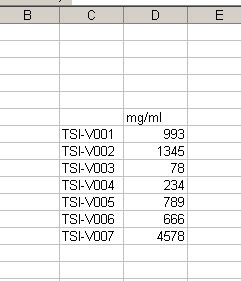 and if I wish to continue this table at next 300 rows at the same repeat TSI sample results, but in different order, it will be a nightmare. Spending more than hour of filling this cells with the same results. But I tried something else in Excel. There is a function IF, so you could use it very "widely" in that situation.
Here is the sample: =IF(H6="TSI-V001",993,IF(H6="TSI-V002",1345,IF(H6="TSI-V003",73,IF(H6="TSI-V004",234,IF(H6="TSI-V005",789,IF(H6="TSI-V006",666,IF(H6="TSI-V007",4578,"")))))))
and I put this code in the cell which I would use for results, or bellow mg/ml.
Simple explanation, should be nice I believe: At the beginning we say to the Excel, if H6 cell is filled with TSI-V001 sample then give to the cell where the code is 993, but if there is not such sample, then look for TSI-V002 and if there is a such sample put 1345 mg/ml. And so on..... until the end.
So what will happen if I put TSI-V012? Then the cell will appear empty or blank, because as you could see at the end "......4578,"")))))))", there is a blank space between these two quotes. So that's it......
Showing posts with label excel. Show all posts
Showing posts with label excel. Show all posts
Monday, 4 April 2011
How to automatically fill data cells in Excel.


Subscribe to:
Posts (Atom)