Or Automatic website change logs and notification
Recently, (after few years without such tool) I have came to the site www.changedetection.com. It is amaizing utility, where you are able to watch distantly sites without visiting them.
Why I think this piece of internet is so important?
Let see what the site says about himself:
What is ChangeDetection.com?
At your request, we monitor any website page for text changes. If a change is detected we send you a notification email. We also maintain a log of recent changes to the page and allow you to see the difference between any two versions of the page.
Yes, that site could help you to find job. How? Very easy. Let say that someone wish to apply for any particular company and definitely will be happy to know about any changes in the Careers site. So when position appears there, www.changedetection.com just sent you an e-mail and you could directly visit the targeted site for changes.
Just a simple example how it works. Targeted site is carriers section of Halifax water.
http://www.halifax.ca/hrwc/EmploymentOpportunities.html
First from the main site you should put the web page address and your e-mail, where changedetetion.com will send you warning e-mail with the web site changes.
Step 2 is a little, but a little bit complicated, because you could set up your alert. But nothing strange look the picture below: At alert name you could choose the name of the alert : for example Employment opportunities at Halifax Water.
Then you could choose how often to be sent alert. I recommend daily. This doesn't mean you will receive alert every day. This mean the site of HW will be checked every day and something appear changedetection.com will send you alert e-mail.
The next is for a sizable changes. Sizable changes are changes bigger than small ones HAHAHAHA! No, actually small changes are changes of the dates and small errors. So check that.
The third one is "only send alert if text is added" - I recommend that. Also you may choose what words to persuade. For example if you need accountant position, then put in the area "accountant". The last two options are not important for me. They are related with sharing and I don't see any reason to check them.
At the end just press Create button.
Another good option of www.changedetection.com is that you are able to create account there. This give you an opportunity to manage your account there: You could manage all your monitors, recent changes and recent alerts. Currently for example I monitoring 13 pages and continue to increase their number.
Very good option is recent changes, you may see what exactly is changes like here:
So if you wish try this good tool, hopefully it will help you to get hired in the desired company.
Thursday, 5 May 2011
How to: Be in constant touch with changes on a particular website


Monday, 4 April 2011
How to automatically fill data cells in Excel.
Huh.... I had big problems to fill data cells in Excel for a long time. At time when I wish to fill 200 - 300 cells with same data, I started to dream nightmares. What I am talking about. For example look this table here: 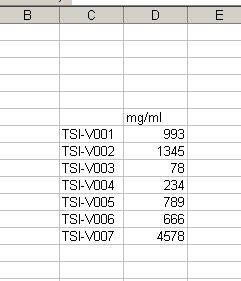 and if I wish to continue this table at next 300 rows at the same repeat TSI sample results, but in different order, it will be a nightmare. Spending more than hour of filling this cells with the same results. But I tried something else in Excel. There is a function IF, so you could use it very "widely" in that situation.
Here is the sample: =IF(H6="TSI-V001",993,IF(H6="TSI-V002",1345,IF(H6="TSI-V003",73,IF(H6="TSI-V004",234,IF(H6="TSI-V005",789,IF(H6="TSI-V006",666,IF(H6="TSI-V007",4578,"")))))))
and I put this code in the cell which I would use for results, or bellow mg/ml.
Simple explanation, should be nice I believe: At the beginning we say to the Excel, if H6 cell is filled with TSI-V001 sample then give to the cell where the code is 993, but if there is not such sample, then look for TSI-V002 and if there is a such sample put 1345 mg/ml. And so on..... until the end.
So what will happen if I put TSI-V012? Then the cell will appear empty or blank, because as you could see at the end "......4578,"")))))))", there is a blank space between these two quotes. So that's it......
Friday, 18 February 2011
http://www.magnatune.com/
Really nice place for good music.
Listen that album it is nice. This is a really nice band.
Twisted by Sophia Marie
Saturday, 10 July 2010
Good Job search engine all over the world.
Hello few days ago I found really interesting job search engine. The name of this engine is 
What is good in this and what is different from the others which I previously know?
Pros:
1. It seems to be very simple to work with this site just look the interface: 
To search job you should put the name of the job in the field "What" and in the field "Where" you should put where exactly you need to search it.
2. Why I really like it? Lets start with the phrase
environmental engineer and I need to find such kind of job in Alaska for example. Our search box need to be filed like that:


OK press search and here the returning results

I will try third one
TASO-2817: Environmental Safety and Occupational Health Engineer, Analyst, Subject Matter Expert - Senior Level
and this is the greatest think which I liked in this engine at first look. Actually it brings you directly to the site with the job. No advertisement, no bars around, no registrations. Very easy and simple. The next think which the job searcher should do is to press the button for sending resume.
3. You can setup e-mail alert just press the button: 
this menu will appear:
Here you can setup your own alert. Don't forget to check he box to receive the e-mail alert for that kind of jobs.
Cons:
1. I was not so glad to found that I should change the country to search in Canada for example or in Bulgaria. You can't just put in the search field
What : "Janitor"
Where : "Windsor, Ontario"
To do that you should press on the bottom of the page the letters CA. This lead you to the same site with different web address www.job-rapido.ca. I am not sure why the developers used this name but it is a little bit frustrating. I always want to remember simple words. Of course this time I should remember for me www.job-rapido.ca. As you can see there is a lot of other countries and you should decide where to do your job search.
Conclusion:
I can say I like this engine and I will use it often to search into my job search adventures. I recommend you to use it because it is simple.
Prices DealExtreme vs Source.
Interesting. I just watched to find how to connect two network cables. Asking around people tell me that the best source is Source to find "Network Coupler"
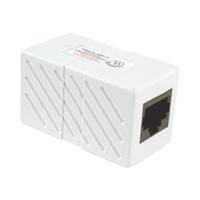
What is a network coupler actually. This is a something like this
when you have two RJ-45 wires you could connect them trough this simple device. For example if you have 3 m. cable and another 5 meters cable with RJ-45 jacks you can connect them with this coupler. OK but I found in Source this simple device for 19,99 dollars!!! I think this is a very expensive for a such small part of plastic with two coper wires inside....
Then I just looked around my favorite site for gadgets www.dealextreme.com.
Here the price is a little bit different look:
http://www.dealextreme.com/details.dx/sku.2657
1,13 for 1. Not like 19,99 argh! 20 times more.
OK it is normal to keep my money here I will by this one from Chinese site of course.